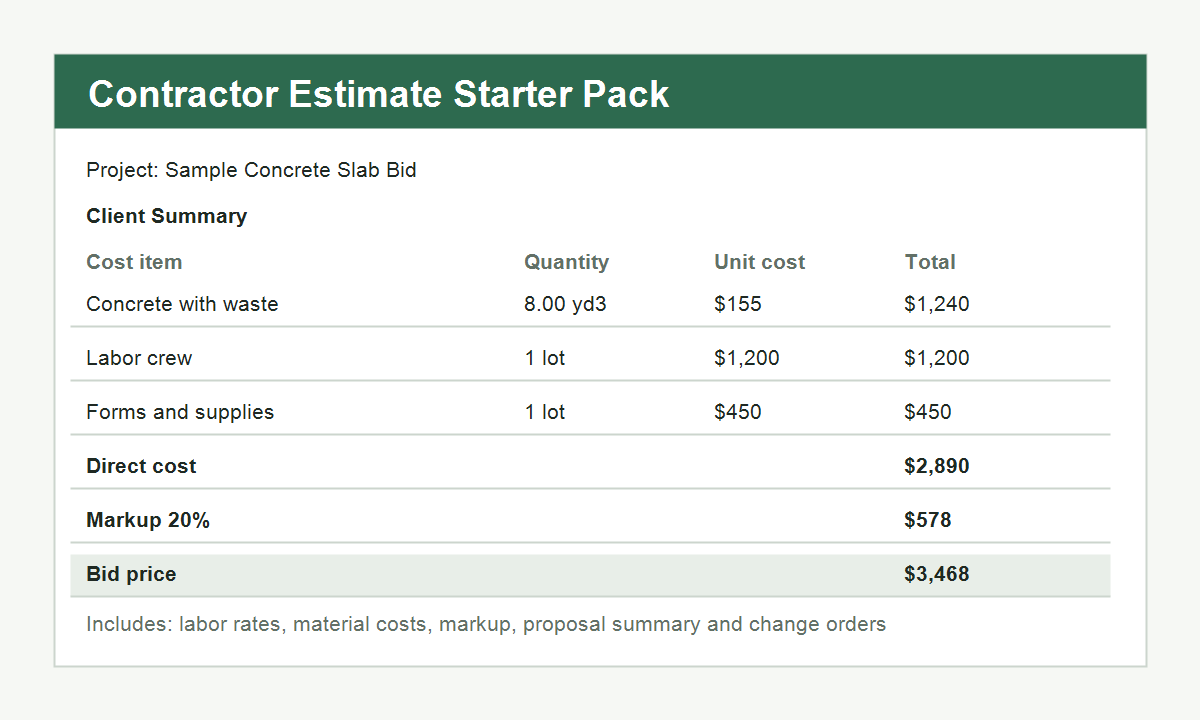
One editable Excel workbook
The buyer receives one downloadable `.xlsx` estimating workbook that can be edited immediately in Excel and adapted to an existing workflow.
Construction estimating workbook
A practical Excel workbook for contractors who want a clearer estimate structure, reusable labor and equipment tabs, a dashboard review page and a change-order log without starting from a blank file.

What the buyer receives
The buyer receives one downloadable `.xlsx` estimating workbook that can be edited immediately in Excel and adapted to an existing workflow.
The `Start Here` sheet explains where to type, what colors mean and how the workbook is meant to move from setup to estimate to review.
The value is not a single sample bid. The value is a repeatable file structure that can be reused across jobs and changed scopes.
| Option | What you get | What usually stays unresolved |
|---|---|---|
| Blank spreadsheet | Total flexibility and a clean starting point. | You still have to invent the tab logic, review flow and commercial structure every time. |
| Generic free template | A quicker starting layout than a blank file. | Many free files still hide labor, equipment, markup or proposal logic in ways that are hard to reuse. |
| Contractor Estimate Starter Pack | A reusable workbook path with setup, estimate, rates, dashboard and change-order handling already separated. | You still replace the placeholder assumptions with your own market, crew and tax reality. |
Many small contractors estimate in Excel but end up rebuilding the same project header, labor logic, markup lines and proposal summary over and over again.
When labor burden and equipment recovery are scattered around the workbook, the estimate becomes hard to review and even harder to update.
Extra work often gets priced informally, which makes approvals and margin recovery harder. The starter pack gives those changes a dedicated place.
Quick instructions, color legend and a simple workflow so a new user understands where to type and where formulas live.
Project totals, direct cost, bid price and estimated margin in one review view before the proposal goes out.
Line-item estimate sheet for quantities, unit costs, direct cost, markup and bid amount.
Loaded labor-rate tab for converting base wage and burden into a reusable rate.
Equipment cost tab for ownership, fuel, maintenance, utilization and rate recovery.
Separate log for extra work with direct cost, markup, status and final price.
Want to judge that sheet before buying? Read the construction change order template guide to see what a strong extra-work worksheet should contain.
Workbook at a glance
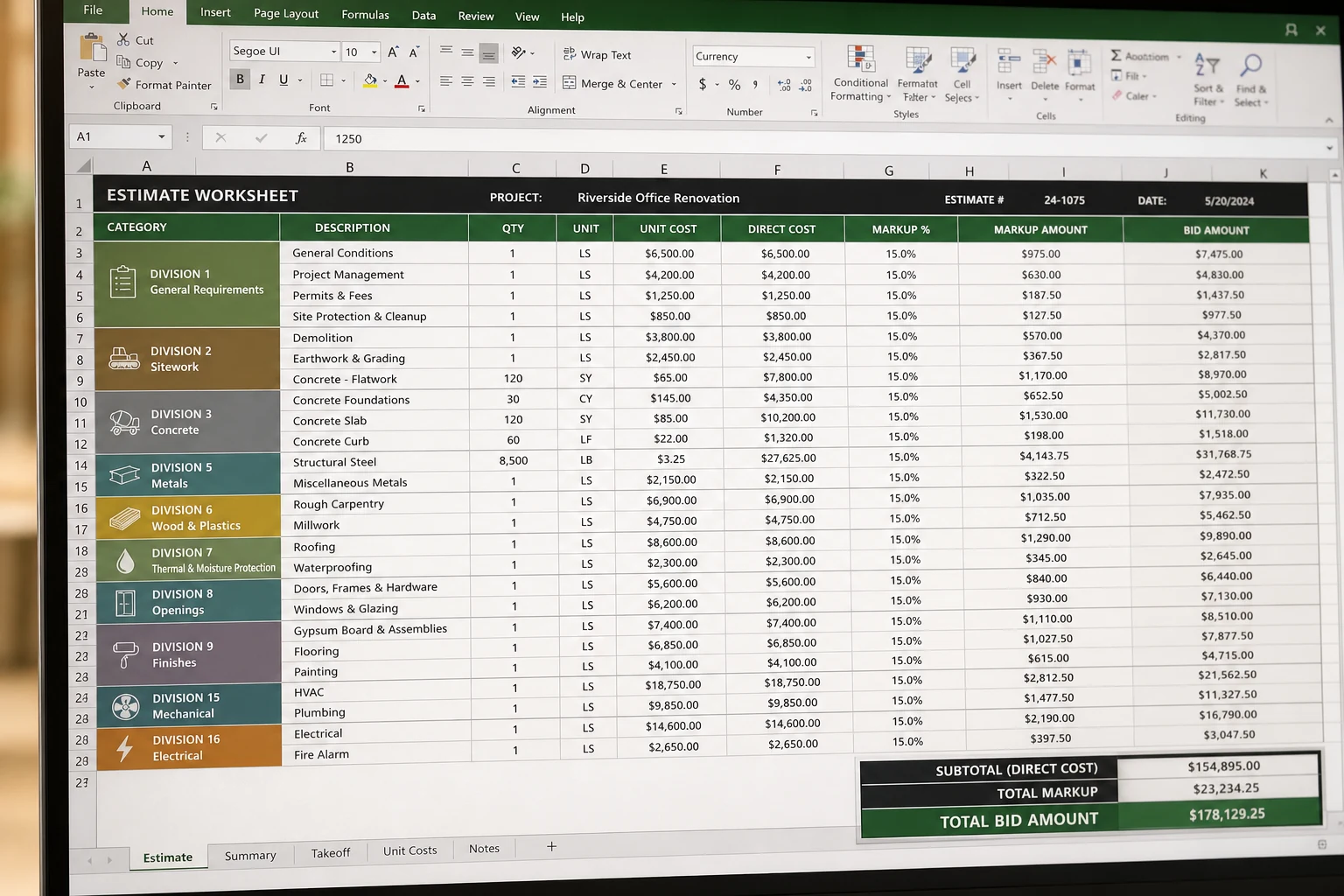
The goal of the workbook is not to impress with many tabs. It is to give the estimator a cleaner path from project setup to line-item pricing, category selection and final review.
Place the job name, assumptions, markup and baseline notes in one predictable starting area.
Enter quantities, categories, direct cost and bid amounts where the pricing work actually happens.
Check direct cost, sell price and expected margin before the bid leaves the office.
Duplicate the workbook for the next estimate instead of rebuilding the whole spreadsheet logic from scratch.
Animated walkthrough
What the motion is showing
This walkthrough is built from workbook screenshots and then annotated with sample values, active cells, dropdown cues and review prompts. The point is to show where a buyer would actually work inside the file, not just flash static screenshots.
This is an animated product preview built on top of workbook screenshots, not a literal Excel screen recording. The actual file remains fully editable after purchase.
If you want to judge the category structure before buying, read the construction cost code template guide. It explains what the workbook is doing when those dropdowns and subtotals are used consistently.
| Estimating task | Typical blank spreadsheet problem | How the starter pack improves it |
|---|---|---|
| Project setup | Assumptions get repeated in several sheets and drift over time. | Project-level inputs are grouped so the estimate starts from a clearer base. |
| Labor and equipment rates | Rates are hidden in formulas or miscellaneous notes. | Dedicated tabs keep reusable rate logic visible and easier to update. |
| Estimate review | The estimator has to scan the whole workbook to check if margin still makes sense. | A dashboard creates a single review stop before the proposal goes out. |
| Change orders | Extra work gets priced in a separate ad hoc file or in an email thread. | The same workbook can hold the change-order logic so the audit trail is stronger. |
| Client handoff | Internal pricing notes and client-facing summary are mixed together. | The workbook is built to separate the working estimate from the cleaner review output. |
Useful when the owner already prices jobs in Excel and wants a more stable estimate, labor and markup structure across kitchens, baths and small additions.
Useful when direct costs and change orders move quickly and the estimator wants a repeatable place for rates, cost build-up and review.
Useful when a newer estimator needs guardrails and a cleaner workbook skeleton instead of inheriting a chaotic legacy spreadsheet.
This file is for contractors, remodelers and estimators who already work in spreadsheets and want a cleaner structure, not for users who want fully automated takeoff, scheduling, CRM and accounting in one system. It works best when the user understands their own scope and only needs a stronger container for the estimate logic.
The workbook is not shipped with your local payroll taxes, ready-mix rates, supplier prices, tax rules or contract language. Buyers still need to replace the placeholder assumptions with their own market numbers. That is intentional. A practical estimating file should make assumptions visible, not hide them.
| Included in the workbook | The buyer still customizes |
|---|---|
| Workbook structure, linked tabs, estimate logic, dashboard and change-order layout. | Labor burden assumptions, local supplier quotes, taxes, subcontractor pricing and project-specific exclusions. |
| Reusable framework for estimate review and bid preparation. | Job-specific quantities, scope notes, schedule assumptions and final commercial judgment. |
It is friendlier than a blank spreadsheet, but it assumes the user understands basic estimating concepts such as quantities, direct cost, markup and job-specific assumptions. It is designed to organize an existing estimating workflow, not teach every trade from zero.
The product is delivered as an editable Excel workbook. It is meant to be opened, customized and reused instead of treated as a locked PDF sample.
No. The point is reuse. A buyer can duplicate the workbook and adapt it across multiple estimates as long as the internal workflow fits the kind of work being priced.
You can reach out through the contact page for workbook questions. Support means clarifying intended use and structure, not custom consulting on a specific bid.
If you want to inspect the underlying logic before buying, read the construction estimate template guide, the labor burden calculator, the equipment rate calculator, the contractor bid guide, the contractor bid template guide, the worked estimate example and the estimate mistakes guide. Those pages show the kind of estimating structure this workbook is built around.