Project setup
Client, project, location, bid date, assumptions, markup targets, contingency and tax settings should be easy to edit in one place.
Excel estimate template guide
Use this guide to structure a construction estimate spreadsheet in Excel with project setup, line items, labor, equipment, markup, tax and a client-ready summary that can actually be reviewed before the bid goes out.

Most searches for a construction estimate template are not really searches for a blank spreadsheet. They are searches for a repeatable estimating system: a workbook that can hold scope notes, line items, labor rates, equipment rates, markup assumptions, tax treatment and a clean client-facing proposal without forcing the estimator to rebuild the same logic on every job.
A good Excel template is not valuable because it has many tabs. It is valuable because the tabs have a clear job and the numbers flow through them in a way that makes the estimate easier to check. That becomes much easier when direct and indirect costs are separated intentionally before markup is applied. If you want to see how that structure reads in a bid-style scenario, use the worked estimate example.
Client, project, location, bid date, assumptions, markup targets, contingency and tax settings should be easy to edit in one place.
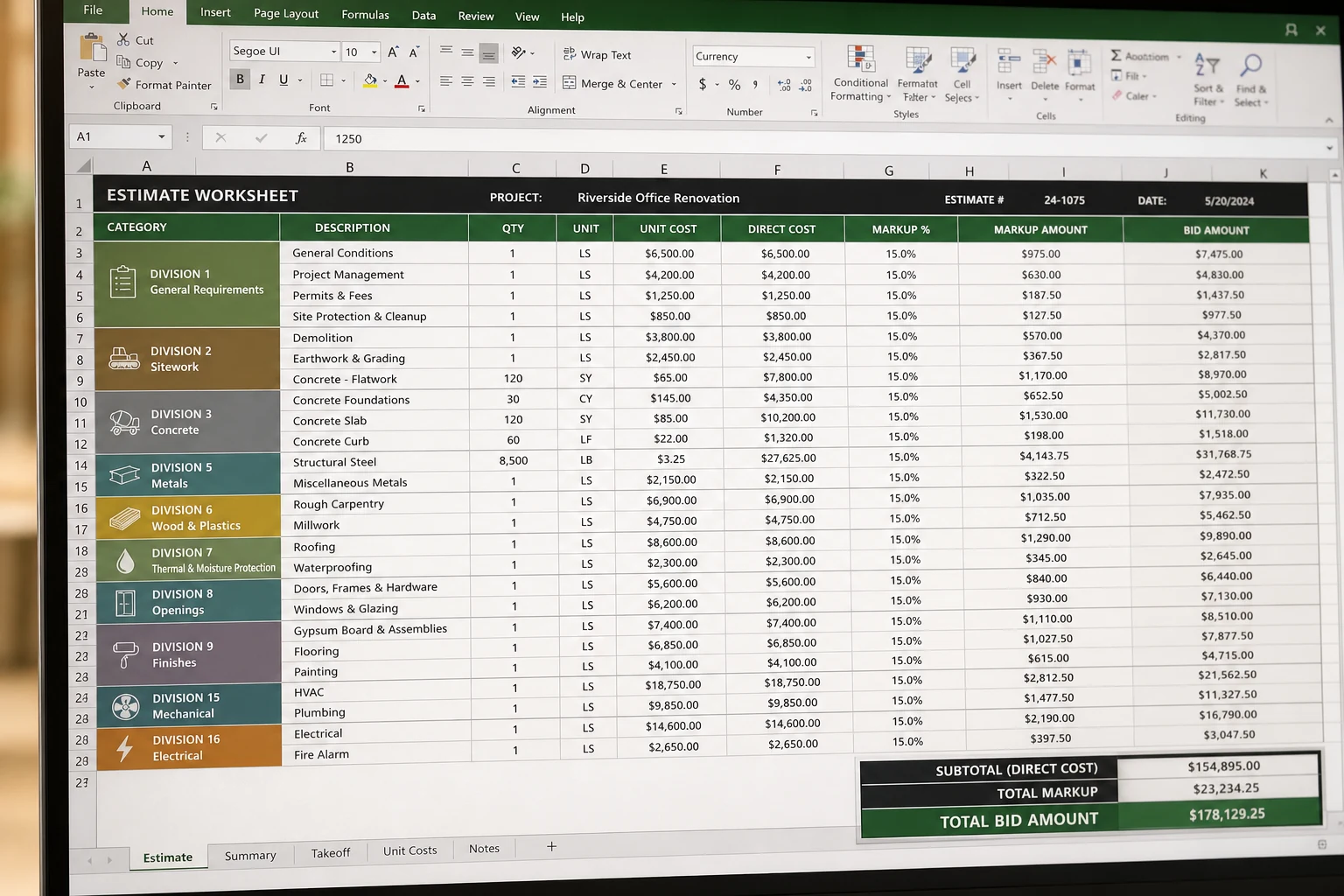
Line-item description, quantity, unit, category, direct cost and sell price should live in the main working sheet.
Separate loaded labor-rate logic from the estimate lines so crew assumptions can be updated without rewriting formulas everywhere.
Ownership, maintenance, fuel, operator and hourly recovery assumptions should be reusable, not buried in miscellaneous allowances.
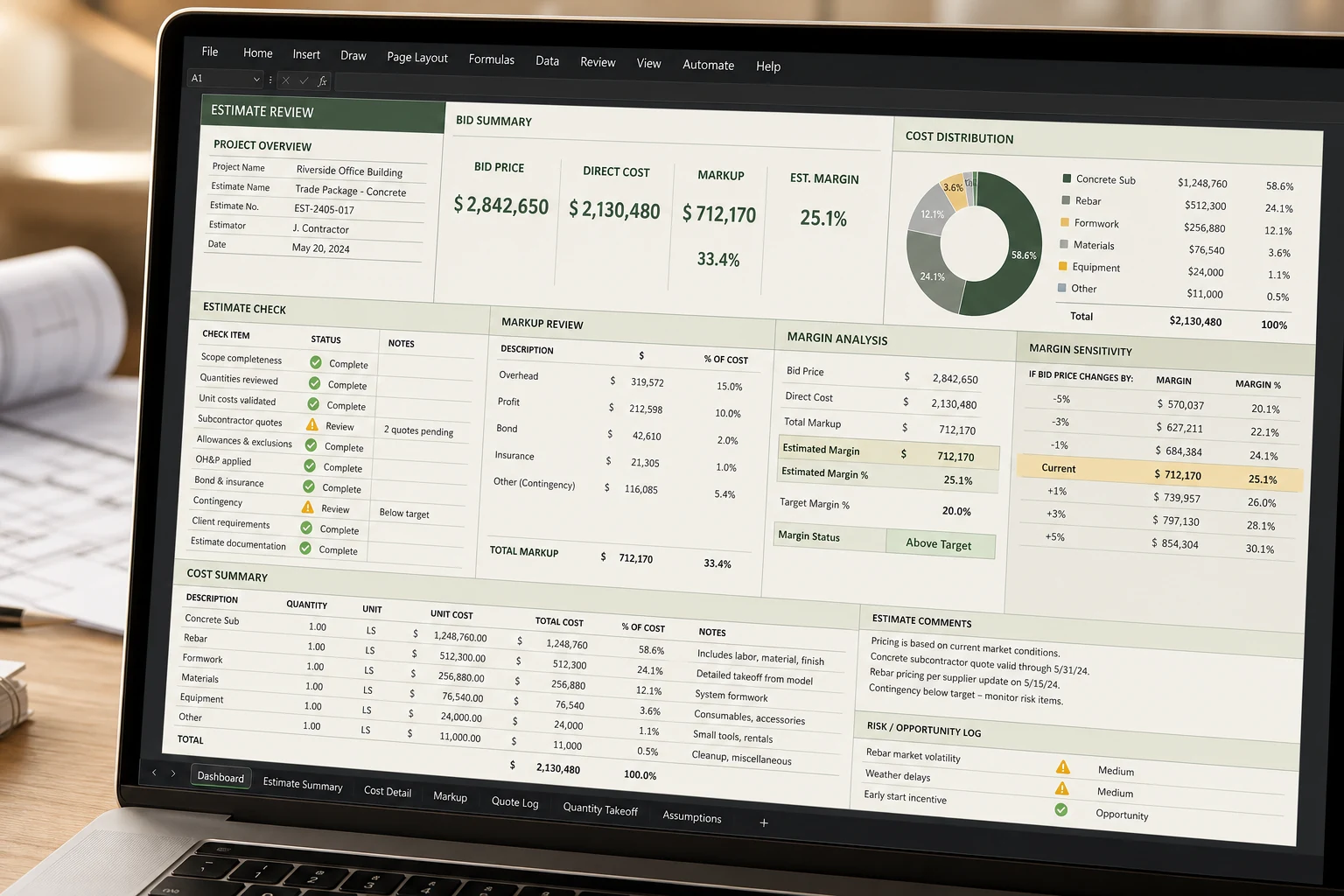
A clean review tab helps the estimator check direct cost, sell price, category mix and expected margin before sending a bid.
Internal estimate logic and external presentation should not be the same sheet. Client-facing outputs need a cleaner format.
| Tab | Minimum fields | Do not skip this |
|---|---|---|
| Setup | Project name, client, date, markup target, contingency and tax assumption. | Keep those assumptions visible in one place instead of scattering them across the workbook. |
| Estimate | Description, quantity, unit, unit cost, category, direct cost and sell price. | Separate editable input cells from formula cells so the file is safer to reuse. |
| Labor rates | Base wage, burden, utilization and loaded rate. | Do not let labor pricing disappear into one hidden allowance. |
| Equipment rates | Ownership, fuel, maintenance, annual hours and hourly recovery. | Machines should recover their own cost instead of hiding inside miscellaneous. |
| Review tab | Direct cost, sell price, markup, margin and large category totals. | If no one can review the estimate quickly, the file is still fragile even if the math works. |
This guide is strongest for teams that still live in spreadsheets and want a better structure, not a completely different software stack.
It helps when the workbook already exists but the tab logic, review path and rate handling need a cleaner baseline.
It is useful when management needs a clearer route from setup to line-item pricing to margin review without scanning every formula manually.
| Step | What the estimator does | Why it matters |
|---|---|---|
| 1. Setup | Enter project details, commercial assumptions, markup targets and tax treatment once. | It reduces repeated manual edits and keeps the estimate consistent across tabs. |
| 2. Working estimate | Price line items with quantity, unit, category and direct cost logic. | This is the real operating sheet where scope becomes a price. |
| 3. Rate checks | Review labor and equipment assumptions separately instead of hiding them in the line items. | It makes loaded costs easier to audit and update. |
| 4. Review dashboard | Check totals, margin, category mix and visible assumptions before the bid goes out. | It catches missing cost buckets and pricing mistakes faster. |
| 5. Client-facing output | Prepare a cleaner summary that does not expose internal working notes in a confusing way. | The estimate becomes easier to communicate and defend. |
The worksheet is where most estimate failures start. A good layout separates editable inputs from formula cells, makes categories obvious and keeps the sell price traceable back to quantity and unit cost. Each line should answer a simple question: what is being priced, how much of it exists, what does it cost and what code or category does it belong to?
That is why worksheet structure matters more than cosmetic formatting. If the estimator cannot tell which cells are inputs, which numbers roll up into category totals or where markup is being applied, the workbook becomes dangerous even if it looks organized.
| Approach | Where it helps | Where it breaks down |
|---|---|---|
| Blank spreadsheet | Useful when the workflow is still being invented or when the job is highly custom. | Usually leads to repeated manual setup, hidden formulas and inconsistent reviews from one bid to the next. |
| Reusable workbook | Useful when the same estimate structure appears repeatedly across jobs. | Still needs project-specific judgment and local inputs. A reusable file does not remove estimating responsibility. |
Older XLS files can still work, but most contractors are really looking for an editable Excel workbook that is easy to maintain. The file extension matters less than the logic inside it. A workbook can be modern and still be useless if labor, equipment and markup assumptions are scattered across hidden cells. A simpler XLSX with visible logic often beats a more complicated file with mystery formulas.
A free estimate template can be enough if you only need a one-off worksheet or if your internal process is still being defined. But as soon as you find yourself retyping labor burden, equipment recovery, change-order pricing or proposal formatting, the real problem is not the lack of a free file. The problem is the lack of a reusable system.
This is where a paid workbook can make sense. Not because paid automatically means better, but because the file already contains the structure you would otherwise keep rebuilding.
A dashboard does not need to be decorative. Its job is to let the estimator or owner scan the estimate and spot problems fast.
Imagine a small remodeler pricing a bathroom renovation, a kitchen upgrade and a small addition in the same month. The scopes differ, but the setup logic is similar: project header, line items, burdened labor, markup, tax treatment and review before sending the proposal. In that case, the value of a template is not the sample numbers. The value is that the estimator does not have to rebuild the logic three times.
If your work is highly specialized, contract-specific or already tied to another costing system, a blank-sheet or custom-sheet approach may be better. The purpose of a template is not to replace judgment. It is to save repetition in a workflow that already exists.
Usually yes. If those assumptions are buried in one estimate sheet, they become harder to maintain and much harder to audit when pricing changes.
A template can work without formal codes, but categories still need to be consistent. Even a simple code structure makes review and later job-cost comparison much easier.
The biggest risk is false confidence. A clean-looking file can still be weak if assumptions are hidden, formulas are overwritten or markup and tax are mixed together unclearly.
The Contractor Estimate Starter Pack is designed for contractors who estimate in Excel today and want a cleaner baseline. It includes project setup, estimate lines, labor-rate logic, equipment-rate logic, dashboard review and change-order tracking. It is not positioned as enterprise software. It is positioned as a practical workbook for people who still want control over their spreadsheet and want a file that already reflects the structure described on this page.
Read the end-to-end estimating guide before choosing a workbook structure.
Go to the Excel estimating guideSee the tabs, screenshots, use case and limits of the starter pack.
View the starter pack pageSet up cost codes before you start building estimate lines.
Read the cost codes guide